LogicLike: ABC & Math for Kids
- 4.6
- Rating
- 10.00M
- Installs
- Free
- Price
 Analysis by App-foxy
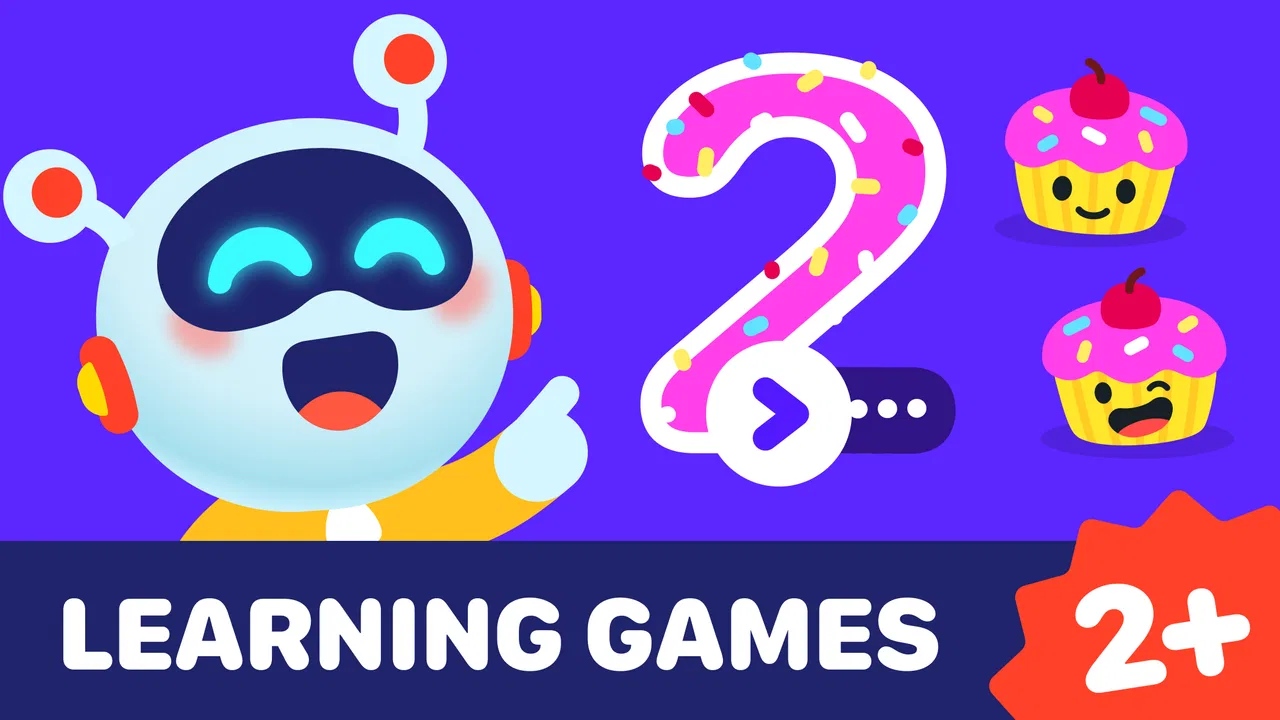
When I tried LogicLike: ABC & Math for kids, the feature that stood out was not simply the number of activities, but the way it turns short learning tasks into a repeatable routine. Instead of asking a preschooler to sit through a long lesson, it gives them small challenges connected with early letters, numbers, logic, and recognition. That makes it easier to use during the little gaps in a normal day, when a child has enough attention for a few focused minutes but not for a formal worksheet.
This is an educational game from Massiana - Educational Games, aimed at children in the Everyone age group. It is free to start, which makes it easy for a parent to test without committing immediately. The app has reached over ten million installs and holds an average rating of 4.5 from around sixty-nine thousand ratings, so it has clearly found a large audience. Those figures do not replace personal testing, but they do suggest that the basic idea works for many families.
Why the short learning-game format matters
The central capability here is guided practice through brief preschool games. A child can move between early alphabet work, number recognition, counting-related exercises, and simple logic activities without opening several separate apps. I found that useful because young children often lose interest during the transition between subjects. Keeping the activities in one place reduces the friction of saying, “Now close this and open your maths app.”
You May Also Like

 AccuWeather: Weather Radar
AccuWeather Review: A Quick, Clear Forecast for Everyday Decisions
For everyday plans, the best forecast is the one you can understand quickly. AccuWeather makes rain timing, radar, and local conditions easy to act on, with a few trade-offs.

 Hill Climb Racing
Why Hill Climb Racing Still Turns Crashes Into One More Run
A tiny car, a bumpy hill and one more upgrade: Hill Climb Racing keeps resurfacing because its simple chaos makes every near-miss feel personal.

 AliExpress - Shopping App
AliExpress Makes Global Shopping Feel Personal, but Shoppers Bear the Risk
AliExpress turns a global marketplace into a pocket-sized discovery engine. Its reach is useful, its shopping loop compelling, and its trade-offs easy to miss.

 Lords Mobile: Kingdom Wars
Lords Mobile Is a Kingdom-Building Routine, Not a Quick Match
A case-by-case verdict on the building, battles, device demands, and social commitments that make Lords Mobile rewarding for some players and exhausting for others.

 PDF Scanner app - TapScanner
TapScanner Makes Paperwork Easier to Capture, Check, and Share
TapScanner makes scanning with a phone feel less like a rescue operation and more like a dependable step in getting work done. Its capture tools are useful, though not flawless.

 Block Blast!
 Shows How Much a Puzzle Game Can Leave Out
A quiet grid game shows why puzzle players increasingly value instant clarity, repeatable skill and low-pressure play—and where the genre still needs to catch up.
More From Our News Desk
View All News


The strongest effect is on repetition. Preschool learning depends heavily on seeing the same ideas in different forms, but repetition can feel dull when it looks exactly like a drill. A game-based prompt gives the child a reason to try again. Matching, identifying, sorting, or choosing an answer can feel like play even when the underlying goal is recognition. The real value is making practice easy to repeat without turning it into a battle.
I would not describe the app as a replacement for a teacher, a parent, or hands-on play. It is better understood as a convenient practice layer. A child may work on recognising a letter on the screen, then find that letter on a book cover or point to it on a sign. The screen activity becomes more useful when an adult connects it with something outside the app.
The broad mix also helps families with children who are at different early-learning stages. One child may be ready for simple number activities while another still needs confidence with letters and visual matching. Because the game covers several preschool areas, it can remain relevant as a child’s interests shift. That is more practical than downloading a new single-purpose game every time a child moves from one small milestone to another.
What the activity design feels like in everyday use
In practice, I would use it as a short, clearly bounded session rather than leaving it running in the background. A parent can invite a child to complete a few activities before breakfast, after a quiet rest, or while waiting for an appointment. The short-session approach matters because it keeps the child from treating the app as an endless entertainment stream. It also gives the adult a natural stopping point.
For example, imagine a rainy afternoon when a preschooler is restless while dinner is being prepared. I would set the device somewhere visible, choose a calm moment, and let the child work through a small group of alphabet or number activities. When the session ends, I would ask the child to find a matching letter on a cereal box or count a few safe objects on the table. That simple follow-up turns passive screen time into a conversation and shows whether the child understood the idea rather than merely tapping until something worked.
One practical tip is to avoid correcting every mistake immediately. If a child chooses the wrong answer, I would give them a moment to look again and explain what they notice. The game can provide the prompt, but the adult can add the reasoning that a preschool app cannot fully supply. This is especially useful with logic activities, where the important skill is not just selecting the correct picture but noticing why it belongs.
Another useful routine is to alternate familiar and less familiar activities. Starting with something the child already handles well can build confidence, while a later challenge keeps the session from becoming automatic tapping. I would also stop while the child is still reasonably engaged. Ending on a positive attempt is often more effective than pushing until frustration appears.
The best scenario: a shared five-minute learning habit
The app works best for families that want a flexible supplement to everyday learning. It is particularly suitable when a parent needs a ready-made activity but still wants to remain involved. A child can operate the game independently for a short period, yet the most valuable use comes when an adult watches occasionally, asks questions, and links the screen task to real objects.
It can also help during transitions. A preschooler waiting for a sibling, sitting quietly during travel, or taking a break from energetic play may respond well to a compact activity. I would not use it to fill every spare moment, because children also need physical play, conversation, drawing, building, and unstructured exploration. Used selectively, however, the game gives parents an organised option when they need one.
Families with more than one young child may appreciate the variety. The same device can offer different types of early practice without requiring a separate app for every subject. The trade-off is that a broad collection may feel less specialised than an app built only around phonics or only around counting. If your child has a very specific learning goal, a focused alternative may provide a clearer progression.
I also think the app is more useful for children who enjoy visual prompts and quick responses. Some preschoolers like trying an activity several times and seeing whether they can make a better choice. Others become anxious when an answer is marked wrong or lose interest when the task moves too quickly. In that second case, a physical game with a parent may be the better first choice, with this app used only occasionally.
Where the free model helps and where it needs attention
Being free to start lowers the barrier for parents who want to see whether the format suits their child. That is a genuine advantage over buying a boxed learning program before knowing whether a child will engage with it. At the same time, the app includes in-app purchases ranging from $1.99 to $199.99 per item. I would treat that as an important part of the setup conversation, especially when a child uses the device independently.
Before handing over the phone or tablet, I would review the purchase settings and make sure the child understands that tapping through a screen does not automatically mean buying something. The exact value of the free experience may depend on how much content a family wants to access, so I would test the starting version calmly rather than promising a child that every activity will always be available without payment.
The wide age label is convenient, but it should not be mistaken for a guarantee that every activity will suit every child equally. A younger preschooler may need an adult nearby to explain instructions, while an older child may move quickly through the simplest exercises and want more challenge. The app’s usefulness therefore depends on choosing the right moments and not expecting one difficulty level to fit the whole preschool period.
Another trade-off is screen dependence. Even a well-designed educational game still gives practice through a device. It cannot provide the tactile experience of arranging physical objects, the social feedback of playing with another child, or the fine detail of writing with a pencil. I see it as strongest when it prepares or reinforces a concept that the child then meets away from the screen.
The current version is 2.109.0, and the game requires Android 7.0 or later. That makes it relevant to many Android devices, including some older ones, but compatibility still depends on the particular phone or tablet. I would check the device before planning a long trip around it. A short trial at home is the sensible way to confirm that the controls, display, and performance feel comfortable for the child.
How it compares with familiar alternatives
Compared with printed worksheets, the game offers quicker feedback and less preparation. A parent does not need to print pages, find pencils, or clean up a pile of discarded sheets. The downside is that worksheets can reveal handwriting, drawing, and pencil-control skills that a tapping game cannot show. If your goal is early writing practice, I would pair this app with paper rather than choose it alone.
Compared with video lessons, interactive activities ask the child to make choices instead of only watching. That can make the session feel more active, particularly for children who become restless during a long explanation. Videos may still be better when an adult wants to model a song, story, or physical movement. This game is most convincing when the child needs to practise recognition and simple reasoning, not when the child needs a full lesson delivered from beginning to end.
Compared with a specialised phonics or maths app, its advantage is breadth. The same learning space can support letters, numbers, and logic, which is convenient for general preschool practice. Its weakness is that a child who needs intensive work in one area may benefit more from a narrower tool with a more deliberate subject sequence. I would choose LogicLike for variety and routine, not as the only resource for a specific educational concern.
There is also a difference between this and open-ended creative apps. Drawing, building, and pretend-play apps give children more freedom to invent. LogicLike is more structured: it presents a task and expects a response. That structure is helpful when a child needs a clear beginning and end, but it may feel restrictive to a child who mainly wants to create rather than answer.
Who gains the most from it
I think the best match is a preschooler who enjoys short visual challenges and is beginning to recognise letters, numbers, patterns, or categories. It is also a good fit for parents who want one accessible place for several early-learning themes and are willing to turn the activities into a shared routine. The developer, Massiana - Educational Games, has positioned it clearly as a children’s learning game rather than a general entertainment title, and that focus comes through in the way the content is organised around early skills.
Parents should expect to provide light guidance, particularly at the beginning. I would sit with the child for the first few sessions, observe whether the instructions make sense, and note which activities cause confusion. If the child keeps guessing without thinking, I would slow down and ask them to describe the pictures or numbers before choosing. That small adjustment can make the game more educational than simply celebrating correct taps.
I would skip it, or use it only occasionally, if your child strongly dislikes structured screen activities, becomes upset by mistakes, or needs a specialised intervention. It is also not the right choice for a family looking for a completely offline learning experience. In those situations, puzzles, picture books, counting objects, and guided play may produce better results. The app should support a child’s learning style, not force every child into the same format.
For families who do choose it, I recommend setting a simple purpose before each session: practise a few letters, revisit number recognition, or try a logic challenge together. Keep the device session short, connect one activity to a real-world example, and watch for signs that the child is tired. This approach makes the broad catalogue feel intentional instead of random.
My recommendation after using it
LogicLike: ABC & Math for kids is a useful free educational game for preschool practice, especially when the goal is to build a small, repeatable learning habit. Its strongest capability is the combination of short interactive tasks across early letters, numbers, and logic. That combination makes it easier to fit into family life than a formal lesson, while still giving a child something more purposeful than ordinary screen entertainment.
I like it most as a bridge between digital practice and real-world learning. A few minutes on the device can lead to finding letters in a book, counting toys, or discussing why one picture belongs with another. Without that follow-up, the child may simply become good at responding to familiar prompts. With it, the app becomes a convenient starting point for conversation and observation.
The purchase range means adults should manage access carefully, and the screen format means it should not replace physical play or personal teaching. Those are meaningful limitations, but they do not cancel out the convenience. If you want a broad preschool game that is easy to try, works in short sessions, and gives you several early-learning directions in one place, I think it is worth exploring. I would recommend it to a friend with the same advice I would follow myself: use it briefly, stay involved, and let the child’s real-world curiosity decide what comes next.
FAQs for LogicLike: ABC & Math for Kids
01What age group is LogicLike: ABC & Math for kids suitable for?
LogicLike is designed for children aged 4 to 12. The app offers a range of puzzles and educational games that cater to this age group, aiming to develop cognitive skills, logical thinking, and foundational knowledge in subjects like math and language. It's an engaging tool for both early learners and older kids.
02Does LogicLike require an internet connection to function?
LogicLike can be used both online and offline. While an internet connection is required for initial downloads and updates, kids can enjoy many of the games and puzzles offline. This makes it a convenient option for parents looking to keep their children entertained and learning on the go.
03Are there any in-app purchases in LogicLike?
Yes, LogicLike includes in-app purchases. While the app offers a variety of free content, additional puzzles and educational games can be unlocked through purchases. Parents should be aware of this to manage spending and decide if they want to invest in more content for their children.
04Is LogicLike safe for children to use?
LogicLike is designed with child safety in mind. The app does not contain ads, and its content is educational and age-appropriate. Parents can feel confident that their children are engaging with safe, constructive material that supports learning and development in a secure environment.
05How does LogicLike support a child's learning and development?
LogicLike supports learning by offering a variety of puzzles and games that enhance critical thinking, problem-solving, and basic math and language skills. The app's interactive design keeps children engaged, making learning fun and effective. It adapts to different skill levels, providing a personalized educational experience.
Pros
- Engaging puzzles boost critical thinking.
- Colorful graphics appeal to young users.
- Adaptive difficulty suits various skill levels.
- Encourages independent learning habits.
- Frequent updates add new challenges.
Cons
- Limited free content without subscription.
- Requires internet for full functionality.
- Some puzzles may repeat over time.
- No offline access to progress reports.
- Lack of parental control features.

LogicLike: ABC & Math for Kids
Gallery